
They Asked Us To Build A Customer Portal.
We Ended Up Automating Their Fuel Operations.
But once we started understanding how the business actually operated, we realized the portal was only one piece of a much larger puzzle.


5
Core modules
3
Integrations
WEX
API connected
Project Snapshot
- Industry
- Fuel Distribution & Fleet Management
- Platform
- Custom CRM & Customer Portal
- Focus
- Automating fuel management, customer pricing, invoicing, and reporting
- Integrations
- WEX (EFS) APIs · QuickBooks · Email Services
- Core Modules
- • Customer CRM• Admin Portal• WEX Integration• QuickBooks Integration• Reporting Engine
The brief
The original request sounded simple.
Build a modern customer portal.
Customers should be able to log in, download reports, manage fuel cards, and view invoices.
It seemed like a straightforward dashboard project.
But once we started understanding how the business actually operated, we realized the portal was only one piece of a much larger puzzle.
The Real Problem Was Happening Behind The Portal
Customers only interacted with one side of the business.
Behind the scenes, staff were constantly managing pricing, invoices, fuel cards, reports, and customer accounts manually.
Changing a customer's pricing wasn't as simple as editing a number.
That change affected reports. Invoices. Margins. Historical transactions. Even future credits.
The portal wasn't the real challenge. Keeping every connected process synchronized was.
What We Discovered
The business didn't need another customer portal.
It needed a central system that connected customers, pricing, transactions, fuel cards, invoices, and reporting into one workflow.
Engineering Note
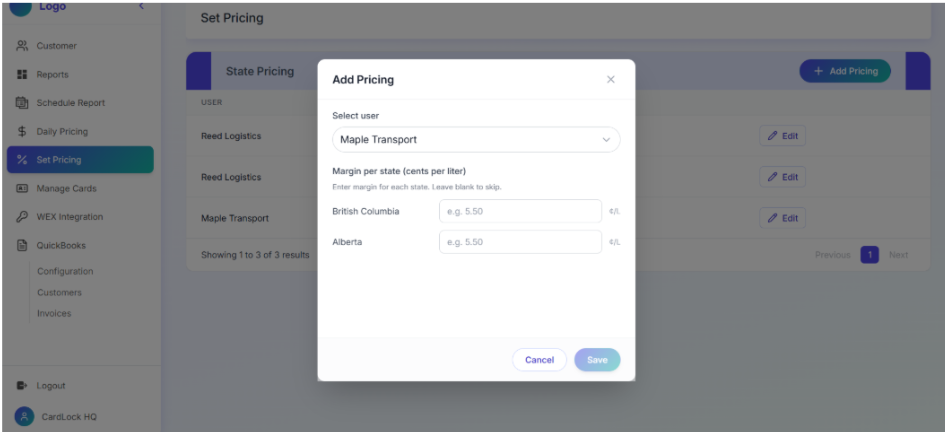
Every customer has their own pricing model with province-based margin rules, meaning a single pricing change can impact multiple reports and invoices across the system.
The portal wasn't the real challenge. Keeping every connected process synchronized was.
A Pricing Change Was Never Just A Pricing Change
One of the first workflows we mapped was customer pricing.
Initially it looked simple. Update a customer's margin. Save. Done.
Except that wasn't how the business worked.
Sometimes pricing changes needed to be backdated.
That meant invoices generated weeks earlier might now contain different totals.
Instead of asking staff to manually calculate corrections, we automated the entire adjustment process.
Future invoices automatically reflect historical credits created by backdated pricing changes.
One Thing We Learned
The complexity wasn't calculating margins. It was ensuring every downstream process stayed consistent after a pricing change.
Connecting A Legacy Fuel Network
Fuel transaction reports
Card management
Card status & updates
Driver cards
Fuel tax reports
Regional volume summaries
Reject transaction reporting
Most of the operational data already existed inside WEX (formerly EFS).
The challenge wasn't collecting data. It was making that data usable.
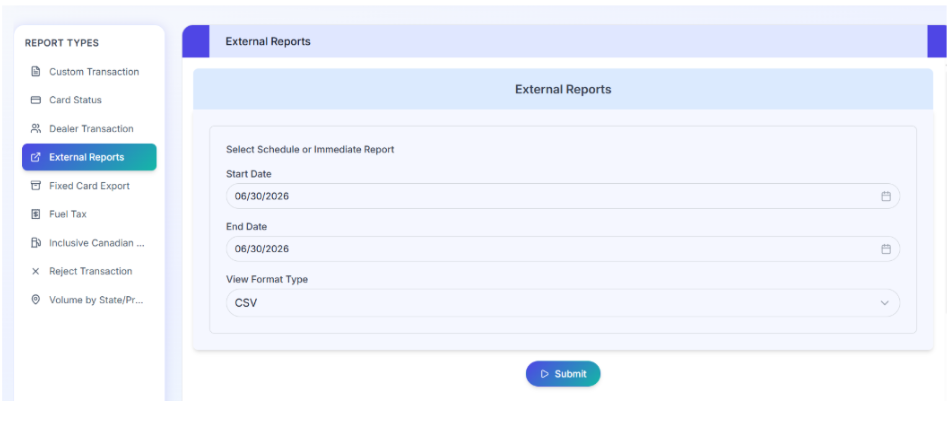
We integrated directly with the WEX API ecosystem to power fuel transaction reports, card management, card status, card updates, driver cards, fuel tax reports, regional volume summaries, and reject transaction reporting.
Instead of forcing users to navigate legacy systems, everything became accessible through one modern interface.
Engineering Note
Many WEX reports require combining multiple API endpoints before the data becomes meaningful. Several reporting modules depended on consolidating card information, transaction history, and location data before generating customer-facing reports.
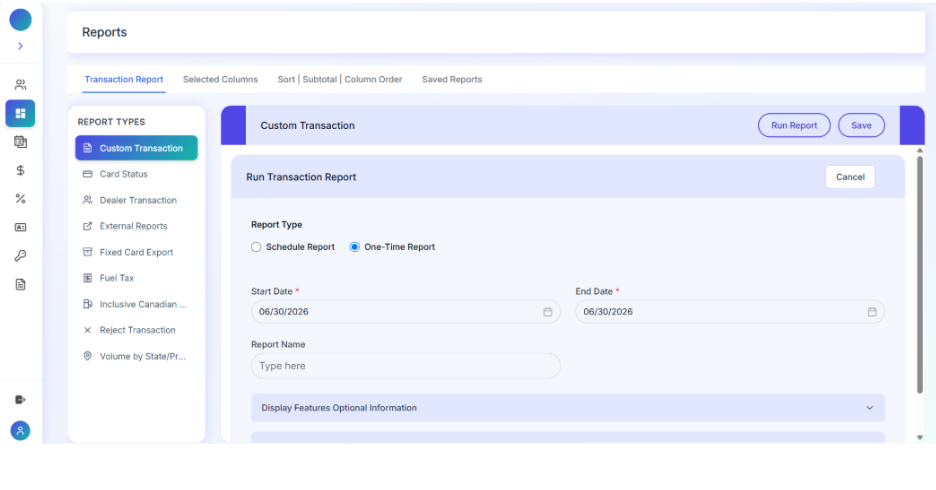
Custom transaction reporting with date ranges, column selection, and one-time or scheduled report generation from WEX data.
Reports Weren't Just Downloads
The client originally wanted reports similar to their existing provider.
But after reviewing how users interacted with them, we expanded the reporting engine.
Customers can generate custom reports based on date ranges, customers, report type, and export format.
Administrators can generate reports for multiple customers simultaneously instead of repeating the same task for every account.
Engineering Note
Backend data transformation became just as important as frontend design. Preparing report data before it reached the user made large exports significantly faster and easier to work with.
We Didn't Want Accounting To Become Another Manual Process
Invoicing workflow
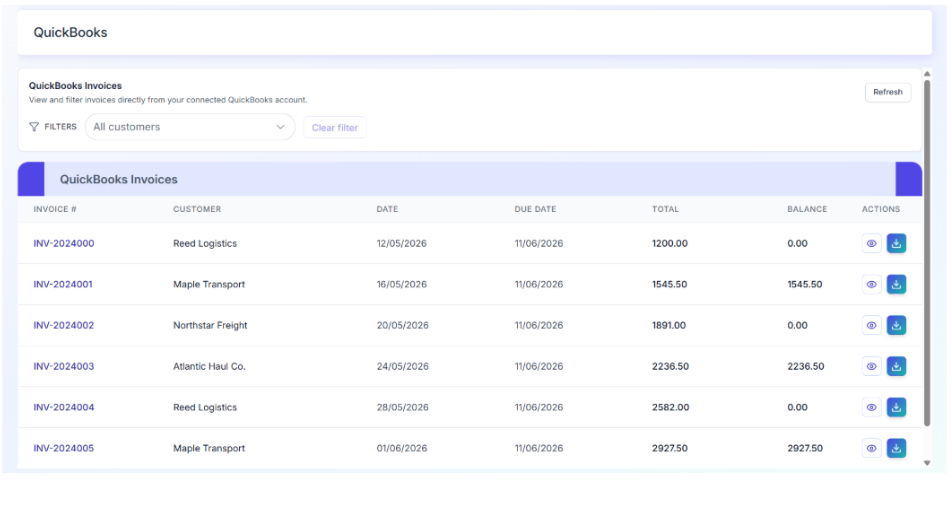
QuickBooks invoice management with customer filtering, balance tracking, and synchronized billing across fleet accounts.
Engineering Note
The QuickBooks integration wasn't designed as a simple data export. It became part of the operational workflow so customer pricing, reports, and invoicing all stayed synchronized.
Generating invoices was already consuming valuable administrative time.
Once pricing, reports, and transactions were connected, invoicing became the obvious next workflow to automate.
Weekly transaction data flows into QuickBooks where invoices can be generated automatically instead of being recreated manually every billing cycle.
More Than A Customer Portal
As development continued, the portal evolved into something much larger.
The platform now includes separate experiences for administrators and customers.
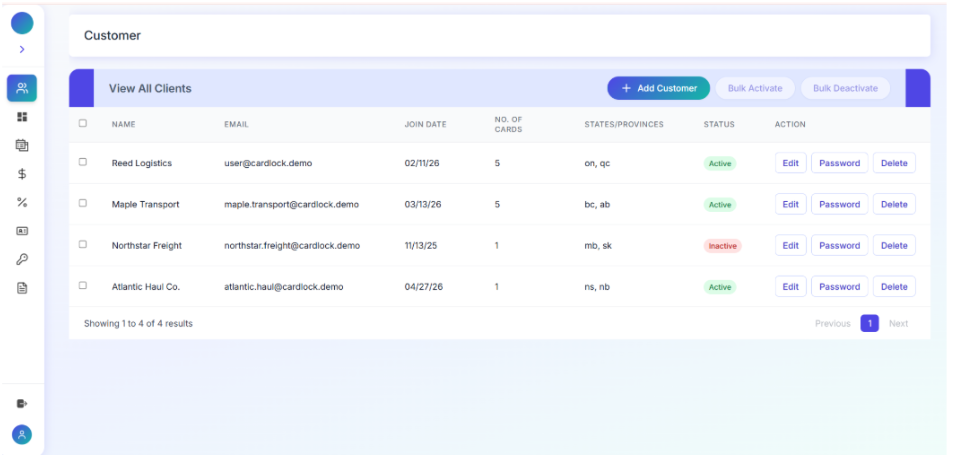
Administrators manage customers, pricing, fuel cards, reports, invoices, and notifications.
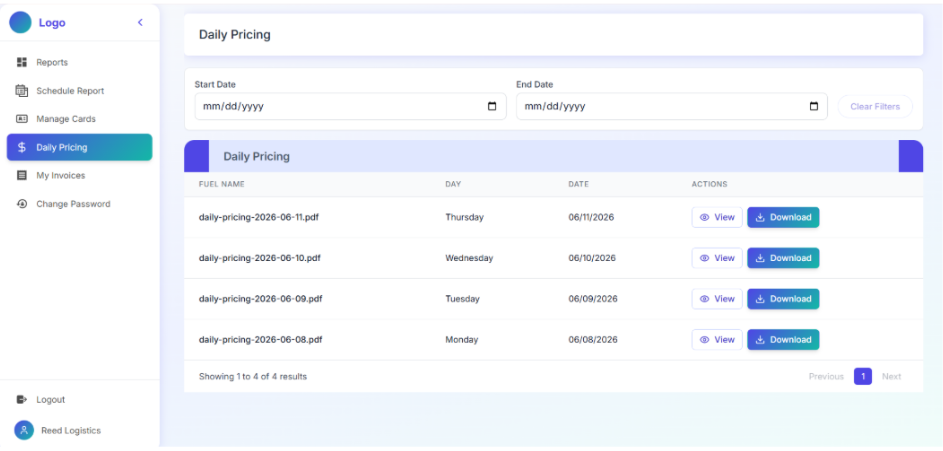
Customers can view invoices, download reports, manage fuel cards, request new cards, track pricing, and view payment history.
Rather than logging into multiple systems, both teams now work from a single platform built around their day-to-day operations.
Behind The Scenes
Role-based access wasn't limited to Admin and Customer. The platform architecture was designed to support future driver-level access without restructuring the system.
The Outcome
Pricing changes no longer trigger manual recalculations.
Invoices stay synchronized.
Reports generate automatically.
Fuel card management happens in one place.
Operational data flows directly from WEX into a custom CRM designed around how the business actually works.
What started as a customer portal became a connected business platform.
Instead of building another dashboard, we automated the workflows that kept the business running.
Explore The Demo
Experience the platform from both the customer and administrator perspectives and explore how pricing, reporting, invoicing, and fleet management work together inside a single connected system.